
Choosing a keypad for your automatic gate comes down to one decision before anything else: wired or wireless. Both work. Both are reliable. The right one depends on your installation — not the price tag or the brand.
Here's how to think through it.
What a Gate Keypad Actually Does
A gate keypad lets authorized users enter a code to open the gate. No remote, no phone app, no card required. Mount the keypad on a post near the gate, wire it or pair it with your gate operator's control board, and program one or more access codes. When a valid code is entered, the relay closes and the gate opens.
That's the core function of every basic keypad on the market. The differences come down to how they connect to the gate system and the features they offer.
Wired Keypads - Typically the Commercial Grade Alternative
A wired keypad runs low-voltage wire from the keypad post to the gate operator or access control panel. The wire carries both the signal and, in most cases, power to the keypad.
Wired is the right call when:
- Conduit is already in the ground from the post to the operator
- It's a new installation where trenching is part of the job anyway
- The installation is permanent and you want zero dependence on batteries
- You need to integrate the keypad directly into an access control system for event logging
What to look for in a wired keypad:
Code capacity matters more than most buyers expect. A residential driveway with one household typically needs 4 or 5 digits in the codes. A commercial property with staff turnover, vendor access, and temporary codes needs 50–500 of these access codes. Make sure the keypad you specify matches the realistic number of users — not just today, but 2–3 years from now.
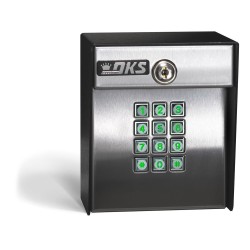
The DoorKing 1515 is a high-quality commercial wired keypad. It has several advantages over others, but the biggest feature is the NFC communication antenna. DoorKing has a software program that you can load onto any Android phone (does not need have an active phone #, just needs to be able to power up, log onto wifi and download the DKS program). The program lets an owner program codes into and out of the app. Then you take the phone to the keypad, touch the NFC-activated app to the antenna on the front of the keypad, and it updates the keypad's memory. It's a standalone unit that programs via a smartphone app — no PC software, no programming cable. To reiterate, you manage access codes from your phone, which makes ongoing administration practical for property managers and commercial operators. It installs on any standard post, works with virtually any gate operator that accepts a normally open or normally closed relay activation. It is built for the kind of daily use a commercial property puts on access control equipment.
The Security Brands Advantage One:
This is also a very popular keypad that our customers really like. What sets it apart is the SMART LED keypad. Security Brands has developed a standard commercial-grade keypad that uses an LED-lit keypad to provide visual feedback during use. Under normal “ready to accept a code” conditions, the keypad is backlit blue. When you enter a good code, the LEDs flash green a few times, indicating a good code and relay activation. Bad code? Red flashes and no activation. During programming mode, the keys are backlit yellow. Finally, this keypad also has a “Hold Open” feature. Special codes can be entered into the keypad to hold the relay indefinitely, allowing an owner to keep the gate open for long periods of time. When the hold open feature is active, the keypad lights up red, making it easy to see the feature is activated instead of thinking something is wrong because the gate isn't closing automatically. That has been a common issue, and Security Brands fixed it with their ingenious use of “Smart LEDs.”
Wireless Keypads
A wireless keypad communicates with a receiver typically mounted under the cover of the gate opener and wired to the main control board. The most efficient use of a wireless keypad is to use one that speaks the same radio signal that the handheld “clickers” use. When someone enters a code, the keypad sends a signal to the receiver, which activates the relay exactly like the standard remote control does. No wire is needed between the keypad post and the gate, and using “compatible” radio signals to the remote controls, a second receiver for the keypad is not required.
When wireless is the right call:
- There's no conduit in the ground, and trenching isn't in the budget
- The gate post is far from the operator — 50 to 500 feet or more
- It's a retrofit on an existing installation, where running wire would be disruptive
- You need multiple keypad entry points across a property
What to look for in a wireless keypad:
Range is obviously an important consideration. Verify it against the actual distance in your installation, not just the maximum rated range, which is measured under ideal conditions. If the signal must pass through a metal fence panel, masonry wall, or heavy landscaping, the effective range can be shorter. A keypad rated for 500 ft in open air may perform differently at 300 ft through obstacles. For that reason, we never quote expected range to a customer. It is usually more accurate to say that adding a wireless keypad will most likely offer the same approximate range as their existing remotes.
Battery life is also an ongoing maintenance consideration. Quality wireless keypads use non-volatile memory, so your codes remain saved even if the battery dies. But someone still has to replace the battery, so plan for it. As battery quality has improved with lithium-ion, using the best battery possible reduces maintenance and the hassle of changing it.
The Security Brands Ridge 2.0 is our most popular, heavy-duty wireless keypad for both residential and commercial applications. It operates at 433 MHz and typically has a longer range than most remotes. It stores up to 500 four-digit access codes and runs on a standard battery. It also includes a “transceiver” in the keypad kit. One transceiver can connect up to 2 Ridge keypads — making it a great option when a customer wants users to “keypad in” and “keypad out” of a property. It also supports latch mode or a “hold open”. This is useful for all-day events, parties, etc., when you want the gate to remain open indefinitely. To release that mode, simply enter the special code again. The relay releases, and the gate opener goes back into normal operating mode. It can control up to 2 separate gates or doors from a single keypad. However, wiring from the transceiver (which contains the relay) must be run to each gate or door.
Quick Comparison
| Wired | Wireless | |
| Installation | Requires wire run to operator | No wire between keypad and operator |
| Power | Usually powered via wire | Battery (keypad); hardwired (transceiver) |
| Best For | New builds, permanent installs | Retrofits, long runs, multi-entry |
| Reliability | No signal interference | Can be affected by obstacles, distance |
| Maintenance | Minimal | Battery replacement |
| Scalability | One keypad per wire run | Multiple keypads per transceiver. |
Surface Mount vs. Flush Mount
One more decision: how the keypad mounts. Surface-mount keypads attach to the face of a post or pedestal — straightforward to install and most common in residential and commercial applications. Flush-mount keypads recess into a column or architectural post for a cleaner appearance. If the gate entry is part of a designed landscape or a higher-end commercial property, flush-mount looks nicer, but a huge disadvantage to a flush mount is the availability of the same unit years down the road if it fails.
What About Multi-Family and Commercial Properties?
Properties with high traffic volumes or multiple user groups—such as apartment complexes, homeowners’ associations (HOAs), commercial parking facilities, and industrial sites—generally require greater code capacity and a system that facilitates code management. Consider keypads with a capacity of 100–500 codes and either app-based or PC-based management. Some commercial properties may also require event logging, which necessitates connecting the keypad to an access control panel rather than using a standalone unit.
Final Recommendation
If you already have wiring in the ground or are planning a new installation, a wired keypad is a great choice. Consider the DoorKing 1515 or the Security Brands Advantage ONE, or give us a call to ask about the latest keypad options on the market. Technology is changing fast, and wired keypads typically last longer than wireless models in commercial or multi-user applications.
If you're retrofitting an existing system or the post is too far from the operator to make trenching practical, a wireless keypad may be the better fit. The Security Brands Ridge 2.0 works well for everything from a single-family driveway to a multi-entry commercial property. We also carry other wireless keypads that may suit your needs, especially if they use the same radio language as your existing receiver.
Not sure which option is right for your gate system? Gate Openers Direct in Houston Texas is here to help. Call us at 713-330-3333 or browse our keypad offerings 24/7 on our website at Gate Openers Direct. We'll be happy to help you find the right keypad for your operator and installation.
Jay Leatherwood - Founder and President of Gate Openers Direct
Related Products